
One platform for private lessons and centres
Your groups, students, fees and exams… in one place
Madar keeps all your work in order: timetables and code check-in, fees and receipts, protected lessons and online exams. Your students and their parents follow everything on their phones.
A 14-day free trial, no card needed.
- Works in the browser, nothing to install
- Fits phones and computers
- Arabic and English, light and dark

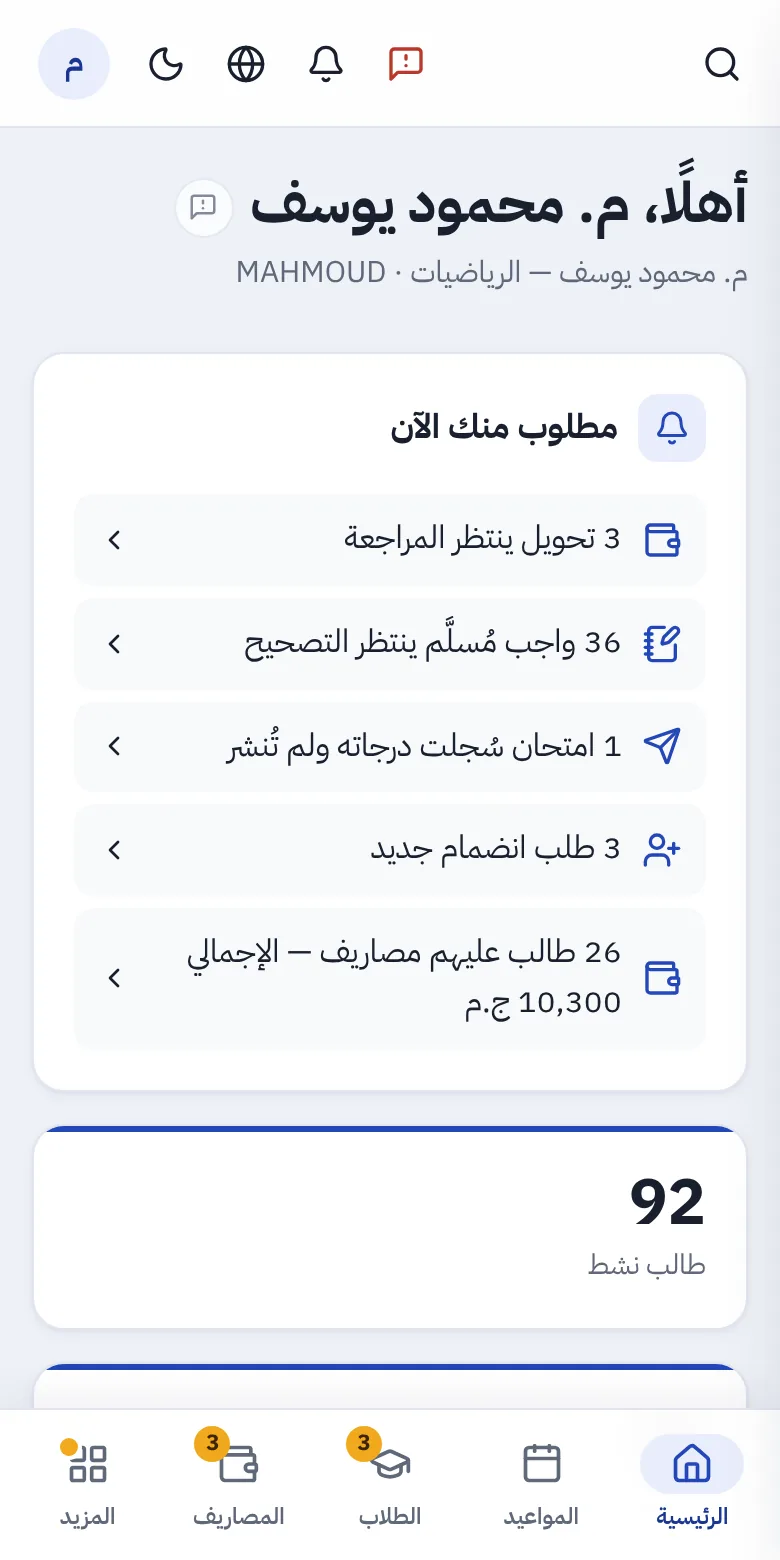
Everything a teacher needs
From the first session to the end of the month: one screen instead of notebooks, chat groups and spreadsheets.
The day's work
Groups, times and attendance at the door, make-ups and the waiting list.
-
Groups and timetable
In-person, online and hybrid groups, a weekly timetable that plans itself, and moving or cancelling a session in one press.
-
Check-in by code or QR
A code that keeps changing at the centre's door or a QR the student scans, a check that they're really there, and online sessions by code or just by joining.
-
QR cards at the door
Print a card for each student and scan it with a phone camera at the door: attendance is marked with a beep, and you see at once who owes fees.
-
Make-up sessions
A student who missed their session attends another group's: they're marked present there, and their absence becomes excused.
-
A waiting list
Group full? A new student waits their turn, and you're told as soon as a place frees up.
Students and marks
Exams that mark themselves, homework, and reports for parents.
-
Online exams
Multiple choice, true/false, matching, ordering, fill-in and essay questions, with a timer, attempts and shuffling, marked by themselves as in Moodle.
-
Question bank
Keep your questions by subject, year, category and difficulty, and import them from Moodle files (GIFT and Aiken).
-
Homework
Homework with a due time and late days, handed in as text or files, marked with a mark and a note.
-
Reports for parents
A monthly report for each student, and a full record of attendance, marks, homework and fees across the months.
-
Honour board and certificates
Each group's top students every month from marks and attendance, with a certificate to save as a picture, print or send on WhatsApp.
Money
Fees, receipts and what's late, expenses and what's left.
-
Fees and how families pay
Monthly or per session, siblings' discount and a set discount or exemption for a student, a receipt for every payment and a list of who owes. Add your InstaPay and wallet number; parents send the transfer's screenshot and you accept it.
-
Expenses and your profit
Record rent, salaries and printing, see what's left for you each month, and repeat fixed costs in one press.
-
Booklets and books
Add a booklet for some groups, and see who got it and who paid, with a receipt for each payment.
Content and messages
Your public page, family accounts, lessons and messages.
-
Your page and join requests
A page with your name, photo and times to share on Facebook and WhatsApp. New students book a place there, and your students sign in there without a code.
-
Accounts for students and parents
Each student and parent follows times, results and what's owed on their phone, and sends the transfer screenshot themselves.
-
Protected lessons and codes
Videos and PDFs watermarked with the student's name and a set number of views, plus codes to sell or give.
-
Announcements
An announcement for every student or one group, shown to them and their parents when they sign in.
-
WhatsApp messages to groups
A session, fees or absence reminder to each parent with their child's name and what's owed, ready in WhatsApp, ticking off each one sent.
Running it
An assistant with the rights you give, subjects and years as you teach them.
-
An assistant with permissions you set
Your assistant takes attendance; you choose whether they collect fees, see the money and enter marks. They never see your profit or salaries.
-
Several subjects and years
A subject and year filter on every screen, and one exam or homework sent to every group of a year at once.

And your students see it on their phones
Every student and parent has an account and signs in from your page with their mobile. No app to install, no lost messages.
- Session times and attendance
- Lessons, exams and homework open now
- Results, rank and the monthly report
- What's owed, how to pay, and sending a transfer
Your own page online
Every teacher gets a page about them: your photo, a few words about you and your years of experience, your groups with their times, which visitors filter by subject and year, a WhatsApp button and your place on the map. Share the link or print its QR on your booklets.
- New students book a place in a group from the page
- Your students and parents sign in there with just their mobile
- Your name and photo show when the link is shared on WhatsApp and Facebook

Start in four steps
-
Open your account
Type your name, the subjects you teach, your mobile and a password. You get your page's link at once.
-
Add your groups
Each group has its subject, year, times and fee, and its sessions plan themselves.
-
Add your students
One by one or from an Excel file, and send each student and parent their sign-in by WhatsApp.
-
Get going
Take attendance, collect fees, upload lessons and set exams, all from one place.
Plans
Pick a plan for your number of students and what you need. You can change it at any time.
Every new account starts with a 14-day free trial on the “Teacher” plan.
-
Starter
EGP 800 a month
That's EGP 20 a student a month
- 3 months at once EGP 2,160 Save 10%
- A year at once EGP 7,680 Save 20%
- Up to 40 active students
- 5 GB for lessons and files
- Groups, attendance, fees and reports
- Lessons and codes
- Online exams and question bank
- Homework
- EGP 25 a month for each extra student
- EGP 20 a month for each extra GB
-
Free trial plan
Teacher
EGP 1,700 a month
That's EGP 17 a student a month
- 3 months at once EGP 4,590 Save 10%
- A year at once EGP 16,320 Save 20%
- Up to 100 active students
- 15 GB for lessons and files
- Groups, attendance, fees and reports
- Lessons and codes
- Online exams and question bank
- Homework
- EGP 22 a month for each extra student
- EGP 17 a month for each extra GB
-
Centre
EGP 3,000 a month
That's EGP 15 a student a month
- 3 months at once EGP 8,100 Save 10%
- A year at once EGP 28,800 Save 20%
- Up to 200 active students
- 40 GB for lessons and files
- Groups, attendance, fees and reports
- Lessons and codes
- Online exams and question bank
- Homework
- EGP 19 a month for each extra student
- EGP 14 a month for each extra GB
-
Centre
EGP 5,000 a month
That's EGP 10 a student a month
- 3 months at once EGP 13,500 Save 10%
- A year at once EGP 48,000 Save 20%
- Up to 500 active students
- 120 GB for lessons and files
- Groups, attendance, fees and reports
- Lessons and codes
- Online exams and question bank
- Homework
- EGP 15 a month for each extra student
- EGP 12 a month for each extra GB
-
A plan made for you
More than 500 students? We'll make a plan with your numbers, your storage and a price that fits.
- As many students as you need
- Storage that fits your lessons
- Every feature
After the trial you pay each month by contacting us. If a subscription ends you get 7 days of grace, then the space becomes read-only while your students use the site as usual, and your data is kept.
Common questions
Do I need to install anything?
No. Madar works in the browser on phones and computers, for you and your students.
How do my students and their parents sign in?
From your public page, with their mobile number and password — no code. You give them their sign-in from the student's page with a ready message that has your page's link.
I teach several subjects to several years. Does it fit?
Yes. Each group is one subject for one year, and every screen filters by subject and year.
Can anyone else see my students' data?
No. Each teacher has a separate space nobody else enters, passwords are stored encrypted, and we take a backup every night and keep an encrypted copy away from the server. More in the privacy policy.
What happens if my subscription ends?
You get 7 days of grace, then the space is read-only until you renew. Nothing is deleted and your students keep following.
Can I bring my questions from Moodle?
Yes. Export them from Moodle as GIFT or Aiken and import them into the question bank; you can export them again too.
Can I take my data with me?
Yes. From the settings, download one Excel file with your students, groups, payments, attendance, marks and expenses, any time.
What if something goes wrong?
Press “Send to the admin” next to any page or form and describe it. A screenshot is attached by itself, and our team answers you inside Madar.
Ready to get organised?
Open your account in a minute and add your first group today.
Open your account